
Blinq: Digital Business Card
Blinq TechnologiesBusiness
4.81.37K Reviews
- Version
- 1.94.0
- Installs
- 1.00M
- Age Rating
- Everyone
Screenshots
Our Review of Blinq: Digital Business Card
 Analysis by Appyee
So, I’ve recently stumbled upon an app called Blinq: Digital Business Card, and let me tell you, it’s quite the game-changer. If you’re anything like me, you’ve probably got a stack of traditional business cards collecting dust somewhere. Well, Blinq is here to revolutionize that outdated ritual and bring us into the digital age. Let’s dive in and see what makes this app tick.
Starting with a card you can actually use
For me, the useful test is not whether a digital card looks polished on my own screen; it is whether I can share it smoothly while someone is waiting. I’d set up the details I expect to give out most often, then check that the name, role, and contact information are easy to scan at a glance. A card is a tiny introduction, so I would avoid loading it with every profile and link I own. The goal is to make the next step obvious, not to turn a quick exchange into a tour of my online life.
Blinq: Digital Business Card is a business app from Blinq Technologies. It is free to install, with in-app purchases ranging from $9.99 to $87.99 per item, and it is rated for Everyone. Its 4.9 average from around 26,000 ratings and more than 500,000 installs suggest that many people find the basic idea useful, though popularity alone cannot tell you whether it fits your networking habits. The app’s current version is 1.67.1.
First Impressions and Setup
First things first, getting started with Blinq is a breeze. The app is available for both Android and iOS, so you’re covered regardless of your preference. Once you download and open it, you’re greeted with a sleek, user-friendly interface. It’s intuitive enough that you won’t be scratching your head trying to figure out where to begin.
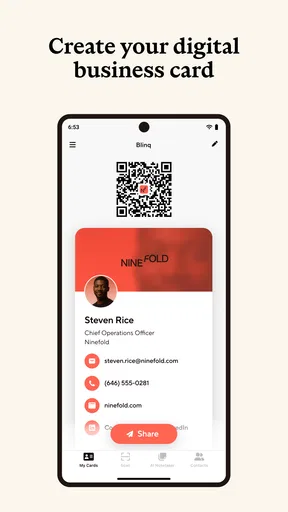
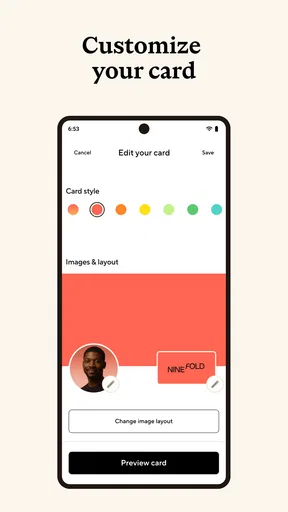
Setting up your digital business card is as easy as pie. You can customize it with your name, job title, company, and all the usual details you’d want to share. But here’s the kicker—you can also add links to your social media profiles, website, or even a personalized video introduction. Now, that’s how you make an impression!
Features That Stand Out
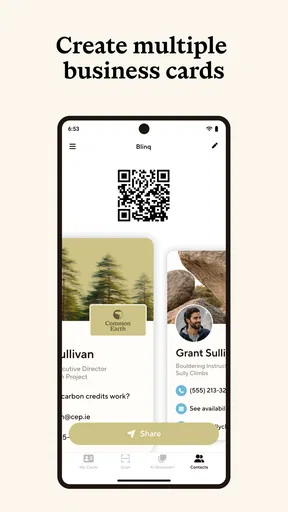
One of the features I absolutely love is the app’s ability to create multiple cards. You can have different cards for different occasions or roles. Say goodbye to awkwardly scribbling additional info on the back of a card when you’re caught off guard.
A practical way to use that flexibility is to make the distinction meaningful. For example, someone who meets clients in one role and speaks at community events in another could keep the details appropriate to each audience. Before sharing, I’d make a habit of checking which card is active; having several versions is only helpful if I choose the right one in the moment. It also gives me a reason to keep each card concise instead of trying to make one profile serve every situation.
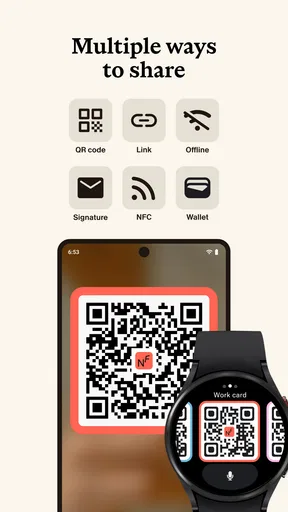
Another nifty feature is the QR code integration. Each card you create comes with its own QR code, which can be scanned by anyone with a smartphone. No need for a Blinq account on their end. It’s as simple as scan, save, and connect. Talk about efficiency!
That makes QR sharing a sensible default at a busy event: I can show the code on my phone rather than dictate a long email address or search through a bag for paper cards. I would still keep the screen brightness high enough to make scanning comfortable and hold the code steady while the other person opens their camera. The recipient’s experience matters too. A QR code removes the need for them to join the same service, but they still need a phone and a moment to scan it, so a short verbal introduction remains important.
And let’s not forget the NFC (Near Field Communication) capability. If your phone supports it, you can simply tap your device against another NFC-enabled phone to share your card. It’s like magic, but real.
User Experience and Design
The design of Blinq is minimalistic yet elegant. It doesn’t overwhelm you with too many options or a cluttered interface. Instead, it focuses on what’s important—making sure your information is easily accessible and presentable.
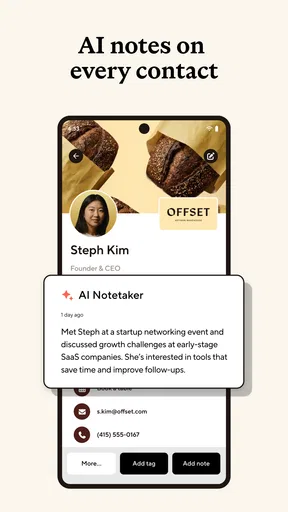
What really caught my eye is the app’s ability to track engagement. You can see who’s viewed your card and how they interacted with it. This feature is a goldmine for networking and following up with potential leads.
I’d treat those engagement signals as a prompt to follow up, not as proof that someone is ready to buy or even remembers the conversation. A view can help me decide which new contact to write to first, but it is not a replacement for a note about where we met or what we discussed. A simple routine works better: after an event, review the activity, match people to my own notes, and send a personal message while the conversation is still fresh. That keeps the app useful without making networking feel like surveillance or turning every view into a sales lead.
Settings and sharing habits that save time
Before relying on a card at an event, I’d check the details that can quietly make a good first impression less effective: spelling, job title, the destination of each social link, and whether the selected card suits the people I’m meeting. A link that once pointed to a current portfolio can become stale, while a video introduction may feel out of place in a formal exchange. I’d review the card whenever my role or contact details change, rather than waiting until someone spots an old detail.
For a repeatable routine, I’d decide on one sharing method for each common situation. QR is easy when a person is standing beside me; a text or email can be more comfortable when we are already messaging; NFC is convenient when both devices support it and the tap works naturally. That way I’m not fumbling through options while trying to remember what the app can do. I’d also keep a paper card or a plain spoken way to exchange contact details for the occasional person who prefers not to scan or tap a phone.
Seamless Integration
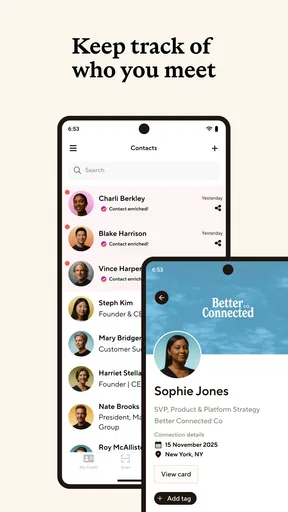
Now, I know what you’re thinking. “Do I have to keep switching between my email and this app?” Fear not! Blinq integrates seamlessly with your email and contact list. You can easily share your card via email or text, or even connect it with your LinkedIn profile. It’s all about making your life easier, and Blinq nails it.
A realistic use case is a freelancer finishing a first meeting at a café. Instead of handing over a card that may be misplaced, they can share a QR code, then use the contact’s preferred follow-up channel later. If the conversation turns toward a different service, a separate card for that role can keep the introduction focused. The important part is to ask how the other person would like to stay in touch; digital sharing makes exchanging details quicker, but it does not decide what kind of follow-up feels welcome.
Where a digital card fits—and where it doesn’t
Compared with printed cards, a digital card is easier to update and can lead someone to more than a phone number or email address. That is a genuine advantage if I change roles, work across several projects, or want to share a portfolio alongside my contact details. Compared with simply sending a profile link in a message, the card gives me a prepared introduction to show in person. But a plain text message may be quicker when a conversation is already happening online, and a printed card can still be more reliable in a room where phones are inconvenient or people prefer something they can keep without opening a screen.
I would skip Blinq if I rarely network, dislike sharing contact details digitally, or mainly need a simple number and email address that I can dictate. It is also not a magic fix for a weak follow-up process: a polished card cannot make a vague introduction memorable. People who enjoy keeping their information in a basic contact app may find the extra setup unnecessary. On the other hand, it makes more sense for someone who meets new people regularly and wants a consistent way to share different professional identities.
Why Go Digital?
In today’s fast-paced world, having a digital business card isn’t just a novelty—it’s a necessity. With the ability to update your information on the go, you’ll never have to worry about outdated details again. Plus, think of all the trees you’ll save by ditching paper cards!
Furthermore, you’re not limited by space. You can add as much information as you’d like without cramming it into a tiny rectangle. This flexibility is one of the key reasons why digital business cards are gaining traction.
Even so, more room should not mean adding every possible detail. I’d put the most useful contact route first and treat extra links as optional paths for someone who wants to learn more. When I change a detail, I’d also think about whether it affects every version of my card or only one role. That small check helps avoid a confusing mix of current and outdated information when I have cards for different occasions.
Final Thoughts
Overall, Blinq: Digital Business Card is a solid app that delivers on its promises. It’s not just about replacing traditional business cards; it’s about enhancing the way we network and connect. Whether you’re a seasoned professional or just starting out, Blinq offers a modern solution to an age-old practice.
If you’re ready to make the switch and impress your contacts with a sleek, digital alternative, Blinq is worth checking out. Head over to your app store, give it a whirl, and watch your networking game elevate to new heights.
My own recommendation is to try it with one well-edited card before building a complicated set of profiles. Practice showing the QR code and sharing by message, then decide whether separate cards genuinely help your work. The app is most convincing when it removes friction from a real exchange, not when it becomes another profile to maintain. If that matches the way you meet people, Blinq is an approachable tool; if your contacts mostly prefer paper or a quick text, there is no need to force a digital routine.
Verdict
Strengths of Blinq: Digital Business Card
- Easy to customize your digital card.
- Seamless sharing via QR code.
- Integrates with major CRM tools.
- Eco-friendly alternative to paper cards.
- Instant updates reflect in real-time.
Limitations of Blinq: Digital Business Card
- Limited offline functionality.
- Free version has ads.
- QR code scanning can be slow.
- Requires account creation to use.
- Some features are subscription-based.
Similar Picks in This Category
View All
LinkedIn: Community & Network
LinkedIn3.8

Zoom Workplace
zoom.com4.1

Microsoft Teams
Microsoft Corporation4.6

Meta Business Suite
Meta Platforms, Inc.4.6

Webex Meetings
Cisco Systems, Inc.4.5

TeamViewer Remote Control
TeamViewer4.4
Frequently Asked Questions
What is Blinq: Digital Business Card and how does it work?
Blinq is a digital business card app that allows users to create and share contact information seamlessly. By using QR codes or customizable links, you can share your professional details with others instantly. You can manage multiple profiles, track analytics, and integrate with your existing contact management systems, making networking more efficient.
Is Blinq available for both Android and iOS devices?
Yes, Blinq is available on both Android and iOS platforms. The app can be downloaded from the Google Play Store for Android users and the Apple App Store for iOS users. It offers a consistent experience across both platforms, ensuring that you can manage your digital business cards no matter which device you use.
Are there any privacy concerns with using Blinq?
Blinq is designed with user privacy in mind. The app allows you to control what information you share and with whom. You can customize each digital card, ensuring you only share relevant details. Additionally, Blinq does not share your information without permission, and you can review their privacy policy for more details on data handling.
Can Blinq integrate with other apps I use for business?
Yes, Blinq offers integrations with various apps and services, including CRM platforms like Salesforce, HubSpot, and Microsoft Dynamics. This feature allows you to automatically update your contact lists and streamline your networking efforts. These integrations help ensure that your contact information is always up-to-date across your business tools.
Is there a cost associated with using Blinq?
Blinq offers both free and premium versions. The free version includes basic features, allowing you to create and share digital business cards. The premium version, available through a subscription, unlocks additional features such as advanced customization, analytics, and integrations. You can choose the plan that best suits your networking needs.
